Adjustable Bed Remote Help: Features, Pairing & Fixes

You're ready for bed, the room is quiet, and the adjustable bed remote suddenly won't raise your head. Or the backlight turns on, but the mattress stays still. Before replacing the handset, it helps to remember that the remote is only one link in a larger chain that includes batteries, wireless pairing, the control box, power supply, cables, actuators, and the bed's moving parts.
This guide helps homeowners identify what the remote controls, understand its wireless technology, check compatibility, and troubleshoot the full system safely. It also explains when a replacement remote makes sense and when the problem may be somewhere else.
Getting Started with Your Adjustable Bed Remote
Late at night, a reader may want the head section raised slightly for a book, press the button, and get no response. A second press may produce a brief movement, while the foot control does nothing. That frustrating pattern can make the entire adjustable base seem broken, even though the actual fault may be as simple as weak batteries or a lost connection.
An adjustable bed remote is the bed's handheld control center. Depending on the base, it may operate head and foot movement, preset positions, massage, lighting, memory settings, and emergency lowering. The first task isn't to press every button repeatedly. It's to identify which functions work, which fail, and whether the base has power.
A useful starting check looks like this:
- Observe the handset: Does a backlight or indicator appear when a button is pressed?
- Listen to the base: Does the control box click, or does an actuator hum without movement?
- Test separate functions: Head, foot, Flat, massage, and lighting may not share the same failure path.
- Check the base itself: A lit remote doesn't prove that the control box or motor system is receiving power.
Practical rule: A remote that lights up can still be unpaired, and a remote that appears dead may only need fresh batteries.
The broader value of an adjustable base comes from matching movement to everyday routines, not from using every feature at once. Readers who are considering that comfort equation can explore the benefits of an adjustable base before deciding whether a remote replacement, repair, or new setup fits the household.
What Adjustable Bed Remotes Actually Control
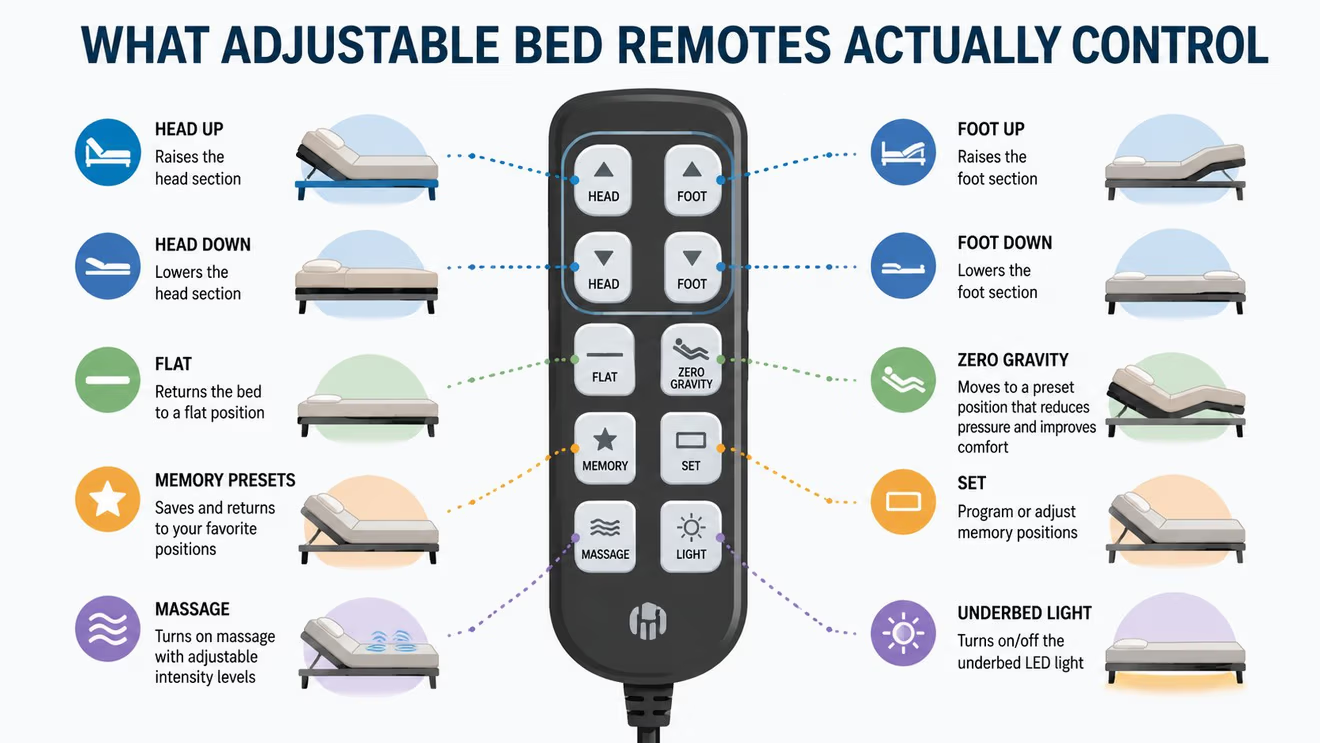
At the basic level, an adjustable bed remote changes the angle of the bed's sections. Head-up and head-down buttons raise or lower the upper portion, while foot-up and foot-down buttons position the lower portion. A Flat button returns the base to a level position, which is useful before getting out of bed or changing sheets. These controls are simple, but they're the foundation for every more advanced setting.
Preset buttons combine several movements into one command. Depending on the base, names may include Zero-G, TV, Lounge, and Anti-Snore. A Zero-G setting creates a coordinated posture rather than moving only the head or foot section. An Anti-Snore setting generally raises the upper body, while TV and Lounge settings provide convenient starting points for sitting or reclining.
The category developed gradually. Adjustable bed development began in 1969, and Flexabed documents the introduction of a new wireless remote in 2008 as the category expanded with split mattresses, hi-low motion, and underbed lighting. That milestone illustrates the change from wired control, where the user stayed tethered to the frame, to wireless operation that became common in modern adjustable beds. (Flexabed's documented history provides the product-development timeline.)
Reading the handset like a dashboard
Modern remotes may also include memory buttons, massage controls, under-bed lighting, and emergency lowering. That makes the handset more than a movement switch. It acts as the interface between the sleeper and the base's available functions.
A practical way to learn an unfamiliar remote is to test controls in a quiet sequence:
- Press Flat and confirm that the base responds.
- Test head movement, then foot movement, separately.
- Try one preset and watch whether multiple sections move together.
- Test lighting or massage only after the primary movement controls are understood.
- Record any buttons that produce no response, since that pattern helps distinguish a handset issue from a base issue.
Readers interested in how a Zero-G position fits into daily comfort can also review this guide to Zero Gravity positioning.
Key Features That Make Life Easier
A remote earns its place beside the bed when its buttons solve real daily problems. Some sleepers need only head and foot adjustment. Others value quick presets, massage, lighting, or an emergency lowering function that keeps essential control available during a power-related situation.
| Feature | What It Does | Best For |
|---|---|---|
| Head adjustment | Raises or lowers the upper bed section | Reading, watching television, and changing upper-body posture |
| Foot adjustment | Raises or lowers the lower section | Supporting the legs and creating a more reclined position |
| Flat | Returns the base to level | Getting up, making the bed, and resetting after use |
| Zero-G | Calls up a coordinated comfort posture | Sleepers who prefer a preset starting position |
| TV or Lounge | Selects a named sitting or reclining posture | Evening reading and television viewing |
| Anti-Snore | Elevates the upper section on supported bases | Households seeking a quick upper-body adjustment |
| Memory | Saves a preferred position for recall | Couples or individuals with established routines |
| Massage | Activates available massage modes | Relaxation before sleep |
| Under-bed lighting | Operates lighting built into the base | Finding the way around a dark bedroom |
| Emergency lowering | Provides a supported lowering function | Situations where rapid return to a lower position matters |
Memory buttons deserve a closer look. Some manuals allow a custom position to be saved by holding a preset button for about 7 seconds, and one guide states that most remotes provide 2-3 memory presets for quick recall. (A guide to remote memory functions documents those examples.) The exact sequence varies, so holding a button longer isn't a universal rule. The base manual should determine the correct method.
Choosing useful features instead of collecting buttons
A remote with many controls isn't automatically easier to use. A household that mostly reads in bed may gain more from clear head adjustment and memory recall than from several massage modes. Someone who shares a bed may prioritize independent controls, provided the base supports them.
The most useful habits are straightforward:
- Label unfamiliar presets: A small note near the bed can help family members remember what each symbol does.
- Save positions gradually: Test a posture before storing it, then keep one memory button for a daily routine and another for occasional use.
- Keep the handset accessible: A remote trapped between the mattress and frame can suffer physical damage or activate buttons unintentionally.
- Check the manual before experimenting: Massage, lighting, memory, and emergency functions may have model-specific controls.
Real-World Scenarios Where Remote Features Shine
After a difficult day, raising the upper body can make reading or resting more comfortable without repeatedly building the position by hand. A Zero-G preset offers a useful starting point, then small head or foot adjustments fine-tune the posture. The practical benefit is fewer button presses when the sleeper already knows what feels comfortable.
Caregivers often need a remote that is easy to use in low light and easy to find beside the bed. A clear Flat button can provide a predictable reset before someone stands. Under-bed lighting may help an older adult locate slippers or move safely without switching on a bright ceiling fixture. These details matter because the remote is used during tired, awkward, or time-sensitive moments.
Couples may have different evening routines. One person might read upright while the other prepares to sleep, or one sleeper may need a gentler leg position for comfort. If the adjustable base has independent sides and the handset supports those controls, each person can make a change without disturbing the other side. The right setup depends on the base, the remote, and how the couple uses the bed.
A caregiver may also prefer a simple handset over one crowded with rarely used functions. Massage can suit a short wind-down routine, while emergency lowering may provide a practical way to return the base to a lower position when normal adjustment is difficult.
Small conveniences add up
Choose features around the household's habits:
- For readers: Head adjustment, TV, Lounge, and an easy-to-reach handset can simplify evening use.
- For couples: Independent movement and clearly separated controls help reduce accidental adjustments.
- For caregivers: Clear buttons, Flat, lighting, and accessible placement may matter more than extra presets.
- For routine-oriented sleepers: A dependable recall function can save effort during familiar bedtime routines.
Keep the remote where users can reach it without twisting or searching. A handset wedged between the mattress and frame can be damaged, and misplaced controls become frustrating when someone needs to adjust the bed quickly. In Milwaukee homes, local guidance can also help match the remote's layout and everyday features to the sleepers who will use them.
Pairing and Compatibility Basics
A replacement adjustable bed remote must match the control box, not just the bed's appearance or brand label. Some handsets use infrared, while newer systems pair wirelessly. Documentation may specify RF protocols at 315 MHz or 433 MHz, and certain compatible wireless remotes use 2.4 GHz RF with a range of up to 32.8 feet, or 10 meters. This technical guide to adjustable bed remotes outlines these communication examples.
Some bases also use Bluetooth Low Energy for mobile-app control. Check the product documentation, FCC identification label, or manual for wireless details. Documentation for a wireless adjustable bed remote provides examples of RF, Bluetooth, and FCC information.
A safer compatibility check
Before ordering, collect every identifying detail you can still find:
- Photograph the label on the bed frame or motor housing.
- Record the base model and control-box information.
- Read the part number on the original remote, even if its case is damaged.
- Compare the replacement's button layout and listed functions.
- Confirm the pairing procedure before blaming the handset.
A remote described as “universal” may still fail with a particular adjustable base. Proprietary signals and model-specific pairing can stop a similar-looking handset from communicating with the control box. If you are comparing a replacement with a complete setup, review adjustable bed options from BILTRITE Furniture-Leather-Mattresses and verify the control-box details before ordering.

Pairing in the right environment
Many adjustable bed remotes use wireless RF links operating under FCC Part 15 unlicensed-device rules. The 2.4 GHz band is shared with Wi-Fi and Bluetooth, so interference may interrupt synchronization. The relevant OEM manual explains shared-band and pairing considerations.
During pairing, keep the handset near the control box. A manual-based benchmark places the devices roughly 5-10 meters apart during binding or resetting, while a flashing indicator may show that the learned state has started. Thick mattresses, bed frames, and nearby RF noise can shorten the usable range. This pairing guidance describes these conditions. In Milwaukee, local furniture guidance can help confirm that the remote, base, and control box belong together before you spend money on the wrong handset.
Common Problems and How to Fix Them
A remote problem rarely has only one possible cause. A handset may light up while the bed remains still because the control box, power supply, actuator, cable, or a mechanical obstruction has failed. Troubleshooting should move from the simplest checks to the deeper parts of the system.
Start with the easy checks
- Replace the batteries: Use fresh batteries and confirm their orientation. Selective button failure can point to weak power rather than a damaged handset.
- Inspect the outlet and power connection: Verify that the base is plugged in and that the outlet works with another device.
- Reset the base: Disconnect power, wait briefly, and reconnect it according to the manufacturer's instructions. Avoid assuming that a reset also completes pairing.
- Check for a lock setting: Some remotes include a child or travel lock. Look for a lock symbol or consult the handset's instructions.
- Re-pair the remote: Follow the exact sequence for the model. Generic button combinations can create confusion or leave the base in a learned-state mode.
What works: Testing one link at a time. What doesn't work is ordering a new handset before checking whether the control box receives power.
If the remote responds but the bed doesn't move, inspect accessible cables for looseness, pinching, or visible damage. A motor may hum without movement if a mechanical bind affects the frame or actuator. The base manual should guide any inspection, and the moving mechanism shouldn't be forced by hand.
A power accessory can also require its own diagnosis. Information about battery power packs for power recliners may help readers understand the broader role of backup power components, though an adjustable bed's wiring and instructions remain model-specific.
Stop home troubleshooting when there's visible electrical damage, a burning smell, repeated clicking, exposed wiring, or a frame that appears mechanically obstructed. At that point, the useful question isn't “Which remote should be ordered?” It's “Which component has failed, and can the manufacturer or a qualified technician identify it safely?”
Your Next Steps in Milwaukee
A replacement remote is only the right solution when the handset is the failed link. If the control box, power supply, actuator, cable, or frame is responsible, replacing the remote won't restore movement. A hands-on evaluation can make that distinction easier, especially when the original model information is missing.
BILTRITE Furniture has served the Metro Milwaukee community since 1928 as a fourth-generation, family-owned business. The Greenfield showroom offers affordable, better-quality furniture, with a focus on USA-made, Amish-made, and solid-wood pieces, along with a large mattress department featuring over 60 models. (Adjustable bed cost guidance can help frame the larger purchase decision.)
The showroom experience lets shoppers test adjustable bases, examine wireless remote layouts, and discuss comfort needs with sales associates who have over 400 years of combined experience. BILTRITE doesn't sell online, and the store is closed on Sundays and Mondays for family time, so checking showroom hours before visiting is sensible.
Come prepared with the old remote, a photo of the base label, and any control-box details. That information gives the team a better starting point for discussing compatibility, features, and whether a new adjustable bed setup makes more sense than a replacement part.
BILTRITE Furniture-Leather-Mattresses offers adjustable bases with wireless remote features alongside USA-made, Amish-made, and solid-wood furniture and a mattress department with over 60 models. Visit BILTRITE Furniture-Leather-Mattresses in Greenfield to test the controls in person and speak with a knowledgeable team about the right adjustable bed solution for the home.