Furniture Visualizer Guide: See It Before You Buy It


A young Milwaukee family can spend an afternoon admiring a sectional, then bring out a tape measure and wonder whether the piece will overwhelm the living room. The sofa may look just right in a bright showroom, yet the critical questions wait at home. Will it clear the doorway? Leave room around the coffee table? Work with the radiator, windows, and the family dog's favorite path?
A furniture visualizer helps answer those questions before delivery day. It gives shoppers a digital view of a piece in a room, but it doesn't replace measurements, good lighting, or a helpful furniture professional. The smartest approach combines all four.
What a Furniture Visualizer Really Is
At its simplest, a furniture visualizer is a digital way to see how a piece may look in a real or planned room. A shopper might use a phone camera to place a sofa on the living-room floor, rotate a 3D model on a product page, or arrange several pieces inside a digital floor plan.
That matters because furniture purchases require more than liking a color or silhouette. A sofa, dining set, mattress, or recliner has to suit the household, the room, the entry path, and the way people live. BILTRITE has helped Metro Milwaukee families work through those decisions since 1928, and the basic concern hasn't changed. People want to feel confident that the furniture will make sense at home. A guide to high-consideration furniture purchases explains why these choices deserve careful thought.
Three common forms
Most furniture visualizers fall into three practical categories:
- Augmented reality placement: The phone camera shows the actual room while a digital furniture model appears on the floor. The useful part is room context. A shopper can inspect proportion next to a lamp, wall, rug, or doorway.
- 3D room planning: This works like a digital dollhouse. The user creates walls, adds doors and windows, then places furniture inside the plan.
- Web-based product viewing: This is the lightest option. A shopper rotates a piece, examines different angles, and may preview available materials or finishes without placing the item in a room.
Each format answers a different question. A rotating model helps with shape and construction details. A room planner helps organize an entire space. AR placement helps answer the most immediate concern, whether the piece seems to belong in the shopper's actual room.
The right expectation
A visualizer shows a useful approximation, not a guarantee. It can reveal that a sectional dominates a narrow room or that a chair leaves little space near a doorway. It can't always judge how a dark finish will look under evening lamps, whether a textured fabric feels comfortable, or whether delivery crews can maneuver the piece through a tight stairway.
That distinction keeps the tool helpful. A visualizer can move a shopper from guessing to informed questions, while measurements and in-person guidance handle the details a screen can miss.
How AR, 3D, and Room Planners Work

The three formats share digital building blocks, yet each suits a different buying question. Choose the preview based on what you need to learn, then confirm important details with measurements and, when helpful, a furniture professional.
AR checks the piece in its setting
Augmented reality uses a phone or tablet camera to read the floor and nearby surfaces. The software anchors a 3D furniture model to that space, so the shopper can move around the room while viewing the piece on screen.
This makes AR useful for checking general proportion, orientation, and placement. A sectional beside a doorway, a chair near a lamp, or a table under a light fixture becomes easier to assess than it would be from a product photo alone. The model still depends on accurate scale and reliable floor detection.
Lighting and room conditions affect the result. A dim basement, cluttered floor, or reflective surface can make placement less stable. Device capabilities also vary, so one phone may provide a smoother experience than another. The augmented reality furniture example shows how this kind of preview places a digital piece within a living room view.
Room planners test the whole arrangement
A 3D room planner starts with the room itself. The shopper draws or enters the walls, adds doors and windows, and places furniture inside those boundaries. That setup supports layout decisions before anyone has to lift a sofa or move a cabinet.
Room planning works well for an empty room, a space under construction, or an area that is difficult to photograph. It also makes comparison easier. A shopper can place a sofa against one wall, move it across the room, and check how each arrangement affects circulation.
BILTRITE's room-planning resource helps shoppers work through walls, openings, furniture placement, and the path through the room. Treat the plan as a working map, then verify the measurements before ordering.
Web viewers inspect the piece
A browser-based viewer focuses on the furniture itself. Shoppers can rotate the model, zoom in, and examine the back, side profile, legs, seams, or visible surface. It is often a practical first filter before a showroom visit.
Use this format to study shape and construction details. It cannot show how several pieces share a room, so it works best alongside AR or a room plan when layout matters. Web-based AR may also let shoppers view interactive models in a browser without downloading a separate app. A retail-focused WebAR study describes browser-based interactive 3D viewing as a practical approach for broad ecommerce access.
Practical rule: Pick the simplest preview that answers the current question. Use AR for room context, a planner for arrangement, and a web viewer for close inspection. Then bring measurements, delivery access, and personal comfort into the final decision.
Why Shoppers and Stores Both Win
A furniture visualizer helps because furniture mistakes are physical, expensive, and inconvenient. A shopper might choose a generous family sofa, only to discover that it crowds the walkway or covers a heat source. A quick room preview can expose that concern before the order is placed.
The shopper's gain is not only visual excitement. Research on AR furniture retail connects product perception and utilitarian experience with purchase intention, which suggests that usefulness and interaction matter alongside appearance. The research on AR furniture shopping supports a practical takeaway: a tool should help people understand the product in context, not make the shopping experience flashy.
Confidence starts with practical questions
A strong visualizer can help a shopper compare:
- Proportion: Does the piece feel too large for the room?
- Placement: Can people move around it comfortably?
- Style: Does the shape work with the existing furniture?
- Finish: Does the color appear suitable under the room's lighting?
- Household use: Is there enough room for children, caregivers, pets, or reclining movement?
The technology also matters to retailers. A clearer preview can reduce uncertainty during the decision process and help a store identify delivery concerns earlier. The broader ecosystem is expanding, with one industry summary reporting a $4.47 billion global 3D rendering market in 2024 and a projection of $26.65 billion by 2034, a 19.55% compound annual growth rate. Those figures come from the industry summary on 3D visualization for home décor brands.
The adoption pattern says something important
Furniture visualization is becoming concentrated among larger, digitally mature retailers rather than appearing evenly across the market. A July 2026 analysis of 42,817 active US Shopify furniture and home décor stores found detectable AR, 3D, or visualization app adoption at 5% of 3,446 stores above $1 million in annual revenue, compared with 13% among the top 500 stores and 26% among the top 100 stores. Below the $1 million threshold, adoption fell to under 1%, according to the furniture AR and 3D configurator analysis.
That pattern doesn't mean a visualizer solves every buying problem. It does show that the technology has moved beyond a novelty for major furniture commerce businesses. For families, the sensible benefit is simple, fewer avoidable surprises and a clearer conversation before a substantial piece enters the home.
Using a Furniture Visualizer the Smart Way
A good preview begins with information you can verify. Before opening the camera, gather the room measurements, product dimensions, and delivery details that determine whether the piece can work in everyday life.
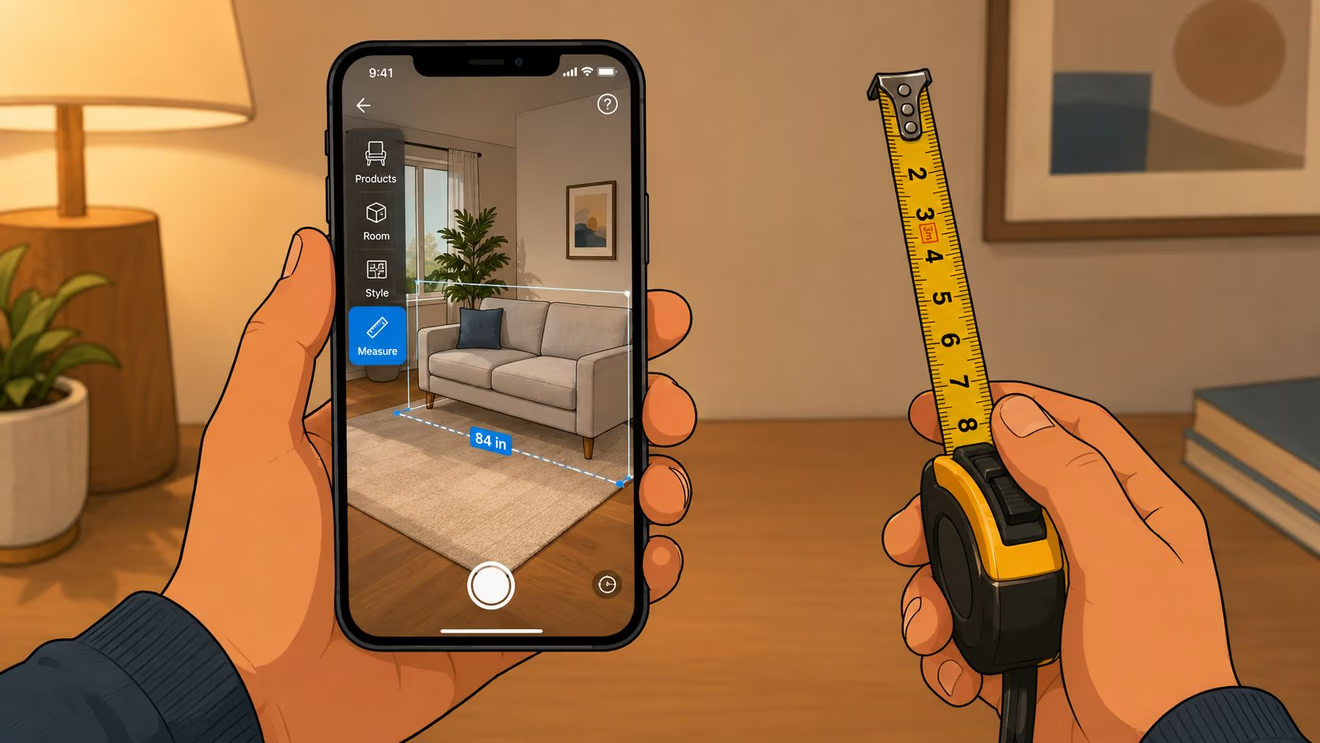
1. Measure the room and the route
Record the room's length, width, ceiling height, and the position of doors, windows, vents, radiators, and outlets. Measure the route too, including the front door, hallway, stairs, elevator, turns, and the doorway where the furniture will enter.
Milwaukee homes often include narrow entries, older stairways, or compact layouts. A large sectional may fit its intended wall and still stop at the first sharp turn. Come-apart furniture can help, but the delivery team still needs a workable path.
Helpful habit: Mark the proposed footprint on the floor with painter's tape. Walk around the outline, open nearby doors, and check whether the household's usual paths remain comfortable.
2. Set up a useful viewing session
Choose a time when everyone who will use the room can look at the preview. Keep the product specifications, your measurements, and a list of questions nearby. This preparation shifts the session from admiring an image to checking a purchase decision.
Look at the piece from the places that matter most, such as the front door, a favorite chair, or the dining table. A family may care about clear conversation space, while someone furnishing a smaller apartment may focus on storage access and an open walking route.
3. Place the piece, then test daily movements
Set the virtual furniture where it would live and review the space from several positions. Check door swings, drawer clearance, recliner extension, table access, and the path children or guests use to cross the room.
Save a screenshot beside your notes. It can help a couple compare options or give a BILTRITE associate a clear starting point for a fit question. The guide to using furniture photos for smarter decisions offers another practical way to examine furniture before committing.
4. Match the room's character
A piece may fit the measured area and still feel wrong for the room. Compare its arm shape, leg profile, seat height, wood tone, fabric texture, and visual weight with the furniture already there.
For a family room, ask whether the arrangement supports conversation and daily use. In an apartment or senior living space, a modest scale may serve the household better than a dramatic silhouette. Custom choices deserve separate attention, including fabric, leather, wood, finish, and hardware, because a phone preview cannot answer every material question.
5. Finish with a human check
Use the final review to identify questions. Save the image, keep the measurements beside it, and bring both to a showroom conversation when the fit, finish, or delivery route remains uncertain.
Keep your taped floor outline and screenshot side by side when you visit the showroom. That way, the associate can compare the digital preview and the actual measurements in one conversation.
When Visualizers Fall Short and a Trust Checklist
A polished preview can create more confidence than the underlying information deserves. Phone cameras differ, room lighting changes, and digital models may simplify details that matter in daily life.
Dark espresso finishes can look flatter on a screen. Textured upholstery may appear smoother than it feels. Sloped ceilings, unusual wall angles, reflective surfaces, and crowded floors can confuse placement. A visualizer also may not show every clearance concern, especially around outlets, vents, radiators, doors, and reclining mechanisms.
Four questions to ask before trusting the preview
-
Does the scale agree with the tape measure? Compare the digital footprint with the product's listed width, depth, and height. If the visual model looks small but the measured footprint takes up much more floor space, stop and investigate.
-
Do the shadows look believable? Shadows should respond reasonably to the room's light direction. A model with a neat digital shadow can still look wrong under a lamp, ceiling fixture, or window.
-
Does anything important get blocked? Check heat sources, outlets, vents, windows, door swings, drawers, walking routes, and the extension path of recliners.
-
Does the room lighting match the preview? Compare the piece in daylight and evening light if possible. Finish and fabric impressions can shift dramatically between a sunny room and a dim basement.
Research on furniture AR indicates that interactivity and informativeness can matter more than simple risk perception in some settings, while other findings don't connect every kind of product information with purchase intention. The 2025 research on AR and furniture shopping experience reinforces why shoppers should judge a tool by its practical usefulness, not by immersion alone.
Know when to pause
If the visualizer passes the checklist and the measurements agree, it can be a valuable planning aid. If the preview leaves questions about scale, finish, fabric, or delivery, uncertainty is a reason to seek help, not a reason to guess.
That extra human review is particularly useful for small-scale furniture, heavy-duty seating, come-apart sofas, and pieces intended for senior living spaces. BILTRITE's color-mismatch guidance also highlights why screens shouldn't be the only basis for judging appearance.
Bringing It All Together at BILTRITE
A digital preview and an in-person conversation solve different parts of the same problem. BILTRITE Furniture-Leather-Mattresses has served Milwaukee families since 1928, and the showroom team brings over 400 years of combined sales experience to questions about comfort, scale, materials, and delivery.
A staff-led visit can include measuring guidance, fabric and finish swatches, and a closer look at custom options for fabric, leather, wood, finish, and hardware. Shoppers can also inspect USA-made and Amish-made solid wood furniture in person, which helps reveal surface character and construction details a screen may soften.
The showroom includes options for apartments, condos, smaller homes, senior living spaces, and families who need heavy-duty furniture. The mattress department has over 60 models, and qualifying mattress purchases may include white-glove delivery service.
BILTRITE doesn't sell online, and the showroom is closed on Sundays and Mondays to support family time. That schedule reflects a local, no-pressure approach. Shoppers can bring room measurements, screenshots, fabric questions, and delivery concerns to 5430 West Layton Avenue in Greenfield, then let the team help sort through the details.
Furniture Visualizer Questions You Are Asking
Are furniture visualizers accurate enough for a major purchase?
They're useful for judging general placement, proportion, and style, especially when the 3D model is true to scale. They shouldn't replace product dimensions, route measurements, finish samples, or an in-person review when the room is tight or the piece is customized.
Which devices work best?
A newer phone or tablet with camera-based AR support usually provides the smoothest experience. A browser-based viewer or room planner can still help when AR isn't available.
How can shoppers visualize furniture before buying online?
They can measure the room, open the visualizer, place or rotate the item, inspect walkways and clearances, then compare the preview with the taped floor footprint. Because BILTRITE doesn't sell online, shoppers can bring those notes to the Greenfield showroom for a guided review.
What should shoppers do when the tool feels wrong?
Pause. Recheck the dimensions, lighting, room boundaries, and delivery route. Then visit the showroom at 5430 West Layton Avenue so the BILTRITE team can pick up where the screen leaves off.
BILTRITE Furniture-Leather-Mattresses offers affordable, better-quality furniture, USA-made and Amish-made solid wood pieces, custom options, small-scale and heavy-duty selections, and a mattress department with over 60 models. Visit BILTRITE Furniture-Leather-Mattresses in Greenfield with room measurements or a visualizer screenshot, and let the local team help turn digital possibilities into a comfortable fit for the home.