3 DAY MATTRESS SALE! THURSDAY - FRIDAY - SATURDAY!
98TH ANNIVERSARY SALE-A-BRATION ENDS SATURDAY, NOVEMBER 7TH AT 5PM!
NO CREDIT CARD FEES!
1000's of Items IN-STOCK + 500 Mattresses!
Largest selection of USA Made Furniture & Mattresses + Amish Made!
FREE In-Store Design Services!
BUY LOCAL & LOVE YOUR HOME!
3 DAY MATTRESS SALE! THURSDAY - FRIDAY - SATURDAY!
98TH ANNIVERSARY SALE-A-BRATION ENDS SATURDAY, NOVEMBER 7TH AT 5PM!
NO CREDIT CARD FEES!
1000's of Items IN-STOCK + 500 Mattresses!
Largest selection of USA Made Furniture & Mattresses + Amish Made!
FREE In-Store Design Services!
BUY LOCAL & LOVE YOUR HOME!
Tuesday-Thursday 10am to 6pm | Friday 10am to 7pm | Saturday 10am to 5pm | Sunday Closed To Be With Family & Friends | Monday Showroom Closed
5430 West Layton Ave, Greenfield - Metro Milwaukee
A shopper settles into an impressive chair executive high back model, leans against the tall padded back, and notices something awkward. The feet don't quite reach the floor. The seat edge presses behind the knees, and the headrest nudges the head forward instead of supporting it in a natural posture.
That moment explains why height alone doesn't make a chair comfortable. A tall back can support the shoulders and head during calls, reading, and screen breaks, but it helps only when seat height, seat depth, lumbar position, tilt tension, and arm height also suit the sitter. A chair that looks commanding beside a desk can still force a shorter person to perch forward or leave a taller person without enough thigh support.
The useful question isn't whether the back is tall. It's whether the whole chair fits a real body, adjusts without a fight, and keeps feeling steady after the first five minutes. That's where measurable specs, durable construction, and a proper seated trial matter more than executive styling alone.
Key Specs to Check on Any High-Back Executive Chair
A seat set too high leaves the feet dangling, and dangling feet change the rest of the fit. The sitter slides forward for stability, loses the lumbar curve, and treats the tall back as decoration. Check dimensions before upholstery thickness or headrest shape.
The OSHA computer workstation chair guidance specifies a seat-height range of approximately 15 to 22 inches, adjustable seat depth, and a backrest at least 17.7 inches high above the compressed seat pan and 14.2 inches wide. That guidance also calls for at least 15 degrees of recline from vertical, plus a lock or adjustable tension, and it recommends a headrest when recline goes beyond roughly 30 degrees.
Feature
Recommended range
Why it matters
Seat height
About 15 to 22 inches, adjustable
Lets feet rest flat on the floor
Seat depth
Adjustable
Supports the thighs without pushing you forward
Backrest height
At least 17.7 inches above the compressed seat pan
Reaches the lumbar curve on a tall back
Backrest width
At least 14.2 inches
Gives shoulder and back room
Recline
At least 15 degrees from vertical, with lock or adjustable tension
Keeps you supported when you change position
Headrest
Recommended when reclining beyond roughly 30 degrees
Supports the head without pushing it forward
Reading the Table in Plain Terms
Seat height decides whether feet plant firmly and knees can rest slightly lower than the hips. Adjustable depth then keeps a small gap behind the knees while still supporting the thighs. Shoppers comparing adjustable lumbar support options should check that the backrest follows the spine's natural curve and that its lumbar pad can move up or down.
Recline control matters because people don't sit in one frozen pose. A lock or tension knob lets the back hold a supportive angle instead of dropping away or shoving the sitter upright. In my experience, a chair that misses two or more rows in the table deserves serious doubt, however substantial the back looks.
Sizing a High-Back Chair to Your Body
A shared desk exposes sizing problems fast. One partner may sit comfortably with shoulders against the upper back, while the other has to scoot forward because the seat runs too deep. The second sitter loses lumbar contact, presses the seat edge into the legs, and props up the posture with muscle effort instead of chair support.
Fit comes from the relationship among seat height, seat depth, backrest height, lumbar position, and body dimensions, not from tall styling alone. A 2025 office-chair evaluation found that seat height mismatched both male and female users, while seat depth mismatched 94% of men and 88% of women in existing chairs. The redesigned chair lowered the seat and shortened its depth, along with changing backrest and armrest dimensions.
Four Fit Checks That Tell the Truth
Feet flat on the floor: Both feet should rest fully without reaching, pointing, or tucking one foot under the chair for stability.
Knees slightly lower than hips: A level or slightly open hip angle feels steadier than knees lifted high by a low, soft seat.
Two to three fingers behind the knees: That small clearance should remain after the back meets the lumbar support, with no hard pressure from the front edge.
Headrest contact without a push: The pad should meet the back of the head during recline, never force the chin down or the head forward.
Plain rule: A smaller chair that places the feet, thighs, pelvis, and lower back correctly will usually beat a grand chair that misses those contact points.
Mixed-height households need wider adjustment ranges because one fixed setting rarely serves everybody. Older adults also benefit from a seat height and arm position that make standing up controlled rather than a push and shuffle. A shopper checking standard chair width should still sit down, because width on paper says nothing about lumbar placement. Oversized executive seats can feel roomy for a minute, then encourage slumping sideways. Arms should support relaxed shoulders, not lift them toward the ears. If the lumbar bulge lands at the belt line instead of the small of the back, the tall back hasn't solved the main fit problem. The chair must meet the body where support belongs.
Materials and Build Quality Worth Paying For
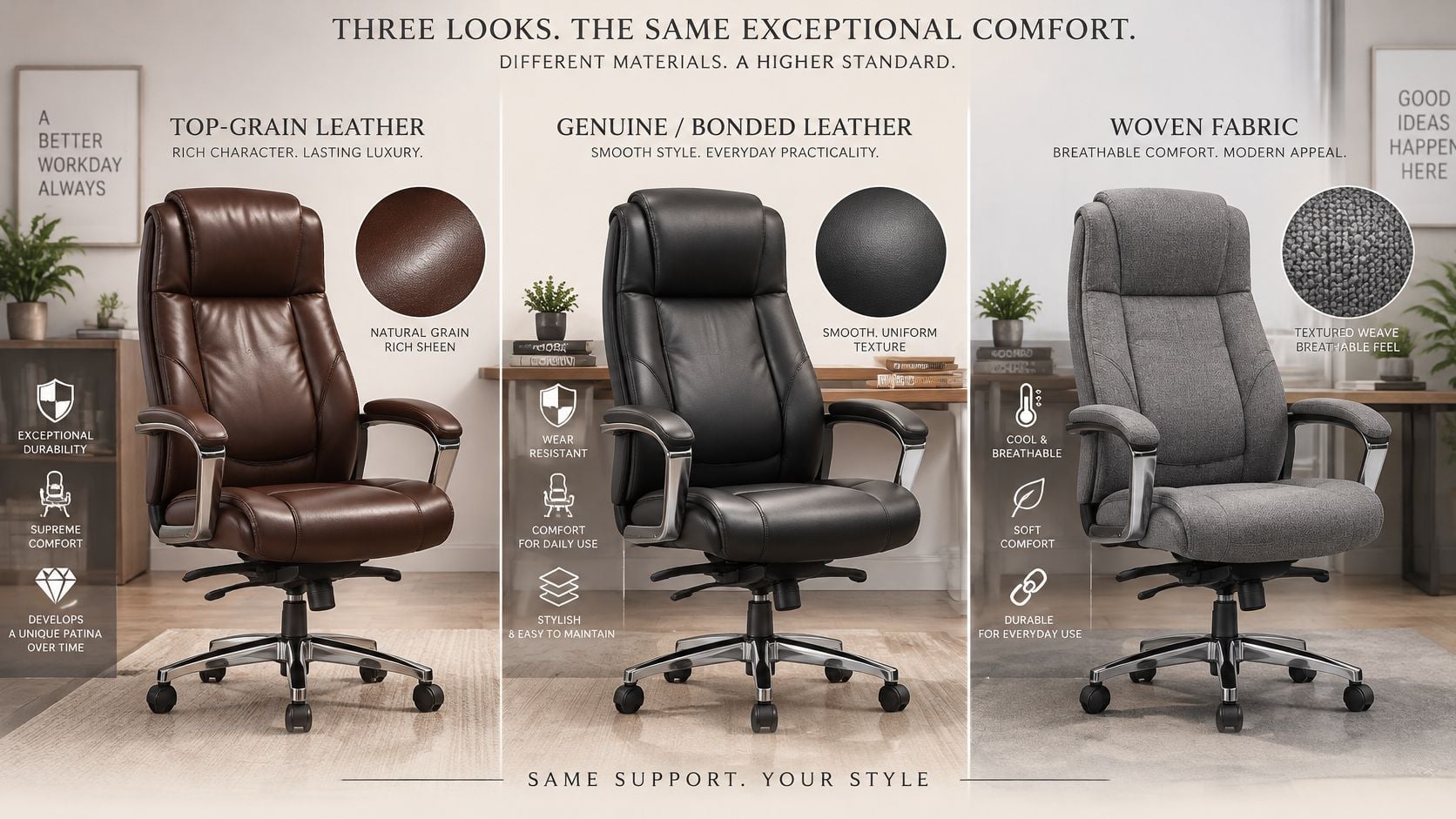
Upholstery is the daily contact layer, so it affects temperature, cleaning, grip, and how the seat feels after an hour. Some materials welcome a quick wipe, others feel softer but hold spills, and mesh trades cushioning for airflow. Shoppers looking at an American made desk chair should compare surface and structure together rather than judge by shine alone.
Material
Strengths
Trade-offs
Top-grain leather
Durable, wipes clean and develops a warm patina
Higher cost and needs occasional conditioning
Genuine or bonded leather
Looks like leather at a lower price
Bonded layers can peel or crack sooner
Woven or upholstered fabric
Soft, breathable and available in many colors
Shows stains and is harder to spot clean
Mesh back
Airy and cool during long sessions
Less padding and a firmer feel
What Carries the Load
A sturdy frame, resilient foam, five point base, secure back attachment, and floor appropriate casters matter more than extra puffiness. Soft foam that bottoms out quickly leaves the sitter on the seat pan, while casters made for carpet may skate or drag on hard floors. Press the front corners, squeeze the arm pads, lean into the back, and look underneath for wobble, thin brackets, or loose movement.
Custom furniture options can let a customer choose fabric, leather, wood, finish, and hardware, which helps a home office chair coordinate with a desk instead of looking dropped into the room. That choice is useful, but it doesn't replace checking the tilt hardware and base.
Origin Labels and Everyday Care
A Sleep Savvy feature on BILTRITE reports that the company began in 1928 as an upholstery shop making custom furniture, became a full-line retailer in 1948, and now selects furniture and mattresses from suppliers. That history gives shoppers a clear way to read labels. USA-made, Amish-made, or solid-wood designations identify particular products or collections, so construction details should be confirmed with showroom staff for the exact piece.
Leather usually needs dusting, prompt attention to spills, and occasional conditioning. Fabric benefits from vacuuming and spot cleaning according to its care code, while mesh needs dust removal from its weave. Ask whether arm pads, casters, gas lifts, and tilt mechanisms can be replaced, since serviceable parts extend useful life. Upholstery repair may be practical while a badly bent frame usually is not.
Durability Tests and What They Tell You
Words like heavy duty sound reassuring, but a test result gives a shopper something solid to compare. A tall executive back creates strain every time the sitter leans, reclines, swivels toward a phone, or pushes away from the desk. The stress lands on the back attachment, tilt mechanism, gas lift, arms, base, and casters, not just the cushion.
The Intertek bulletin on the ANSI/BIFMA X5.1 update states that BIFMA released the ANSI/BIFMA X5.1-2017 edition on February 14, 2017, using a 275-pound 95th-percentile male as the updated test basis. The same bulletin lists 270 pounds for the swivel test and 240 pounds for tilt-mechanism, back-durability, and caster-durability tests.
Test
Load or cycles
What it tells you
Test basis
275-pound 95th-percentile male
Reference body weight for the standard
Swivel test
270 pounds
Base and swivel load
Tilt mechanism
240 pounds and 300,000 tilt cycles
Recline hardware wear
Back durability
240 pounds and 120,000 backrest-force cycles
Backrest attachment and strength
Caster durability
240 pounds
Wheels and base
Seat pan
100,000 cycles
Seat structure
Front corners
20,000 cycles at each corner
Base corners
Armrests
60,000 cycles
Arm attachment
Repeated swivels
120,000 repeated 360-degree swivels
Swivel mechanism
Questions Worth Asking in Person
Ask whether the chair was tested to ANSI/BIFMA X5.1 and which parts that claim covers. Be cautious when phrases such as "heavy duty," "ergonomic," or "built to last" arrive without a named standard or test behind them. A review of fabric durability ratings can inform upholstery expectations, but fabric wear data doesn't prove the recline hardware will hold up.
BILTRITE Furniture-Leather-Mattresses does not sell extended warranties or protection plans. Shoppers should read the manufacturer's written coverage carefully and treat the build itself as the main safeguard. Inspect the tilt mechanism for grinding, test the gas lift for sinking, lean firmly against the back, then roll and swivel the base. Small squeaks can be a loose fastener, but side-to-side flex at the back attachment is a stronger warning.
Setting and Testing Your Tall Back in the Showroom
A tall back should be set in a deliberate order, starting with the seat. Random knob turning creates confusion because every adjustment changes the next one. Sit fully back, bring the shoes onto the floor, and work from the feet upward.
Set the Seat Before Judging the Back
Seat height first: Raise or lower the seat until both feet rest flat and the weight feels even through the heels and forefeet. Don't accept tiptoe contact just because the desk height looks right.
Seat depth second: Slide the seat until the back touches the chair and a small gap remains behind the knees. A deep seat that can't shorten will pull a shorter sitter away from the backrest.
Desk relationship third: Roll toward a desk or table at a realistic height and place the hands where keyboard work would happen. A chair can feel fine in open space, then fail when the arms strike the desk edge.
Dial in Back, Arms, and Headrest
Lumbar position: Move the pad or shaped support into the curve of the lower back. A pad set too low pushes at the pelvis, while one set too high leaves the lower back hollow and unsupported.
Tilt tension and recline lock: Lean back slowly and adjust tension until the chair follows without dumping backward or forcing a strong push. Lock it upright, then lock it in a relaxed angle, and check that it stays put.
Armrest height: Set the arms last so the elbows rest lightly and the shoulders stay relaxed. Arms that sit too high shrug the shoulders, and arms that sit too low encourage leaning.
Headrest use: Save true headrest contact for reclined positions during calls, reading, and breaks. In upright typing, it shouldn't shove the head forward or turn into a hard point behind the neck.
Support feels even and quiet. Pinching, knee pressure, sliding forward, and constantly fidgeting for a better spot are useful warning signs.
Run a Real Seated Trial
Spend several minutes upright as if typing, then several minutes reclined as if listening or reading. Reach sideways, swivel, roll back, stand up, and sit down again without resetting everything from scratch. A chair that only feels good while posed carefully hasn't earned much confidence.
Bring the shoes normally worn for work, since heel height changes seat settings. A partner or staff member can check whether the feet stay grounded while the sitter concentrates on back contact. Shoppers who wear a belt, carry a wallet in a back pocket, or use a thick sweater should notice anything that changes lumbar contact.
Support also depends on using the backrest. A systematic review of workplace sitting interventions concluded that stronger research with longer follow-up and less biased posture measurement is still needed. That's a fair caution against medical promises. A high back can provide contact and perceived support during reclined tasks, meetings, reading, or screen breaks, but it cannot compensate for a poorly adjusted seat or hours of uninterrupted sitting.
Comfort during a trial describes fit, not a cure or a guarantee of better health. The promising result is simpler. Feet remain steady, thighs feel supported, the lower back stays in contact, shoulders relax, and the headrest waits until recline. Standing, walking, and changing position still belong in a workday, even with a well fitted chair!
Before leaving a chair on the shortlist, repeat the recline test after those few minutes of sitting. Foam warms and compresses, arms reveal pressure points, and a gas lift with a slow sink may show itself. What felt impressive at first touch should still feel balanced after the body settles. That final check catches many disappointments while the chair is still on the showroom floor.
Matching the Chair to Your Home Office or Workplace
The best use for a tall executive chair depends on session length, the number of sitters, and the room around it. A private home office rewards fine personal adjustment, while a shared desk needs simple controls that reset quickly. Reading home office furniture arrangement ideas can help with layout, but the chair still has to fit the person and the floor space.
Space or use
Features to prioritize
Practical tip
Home office, long daily sessions
Lumbar support, tilt tension and recline lock
Test a reclined and an upright position before buying
Shared professional desk
Seat height and depth ranges, quick adjustment controls
Plan for several body sizes using the same chair
Meeting or reception area
Sturdy frame, armrests that help you stand up
Check how the armrests feel when you get in and out
Compact room or small apartment
Scaled-down backrest and a footprint that fits the room
Measure the room before you choose a size
Match the Features to the Routine
For long home office days, choose casters suited to the floor and a recline that supports breaks without turning the chair into a lounge seat. Hard floors need a different rolling feel than carpet, and an unsuitable caster can make small movements annoying. A chair mat may help carpet, but it shouldn't hide an unstable base.
A shared desk needs controls that different people can understand in seconds. Seat height, depth, lumbar position, and arm height should reset without tools or obscure levers. In meeting areas, frequent standing makes stable arms and a not too deep seat especially valuable. In a compact room, a scaled-down back may preserve walking space and still provide upper-back contact, provided the seated trial confirms the fit.
Test Your Shortlist in Our Greenfield Showroom
Bring your shortlist to the Greenfield showroom at 5430 West Layton Avenue and put each chair through a seated trial. A tall back can look convincing in a photo and still miss your shoulder blades or push your head forward. The visit is where you find out whether the back height, lumbar curve, and recline fit your body.
BILTRITE has been family-owned and operated since 1928 and serves Metro Milwaukee from this showroom. That hands-on setting suits executive chairs especially well. A photograph cannot show whether a headrest pushes forward, whether foam bottoms out, or whether tilt tension feels smooth at a particular body weight. Bring room measurements, desk height, and the key chair dimensions from home, then compare each shortlisted chair one adjustment at a time. Staff can explain the controls and point out USA-made and Amish-made pieces without hovering.
Many pieces can be customized with a choice of fabric, leather, wood, finish, and hardware, so you can coordinate a home office while keeping value in view. Value here means solid construction, useful adjustment, and materials that make sense for the money. Shoppers can also find small-scale pieces for tighter rooms and heavier-duty choices for busy households.
The showroom is open Tuesday to Thursday from 10am to 6pm, Friday from 10am to 7pm, and Saturday from 10am to 5pm. It is closed on Sundays and Mondays. Questions can be handled by phone at 414-238-2020. Give yourself enough time to sit fully back in each chair, test upright and reclined positions, and check how the arms feel as you stand up. If two chairs feel close, change one setting at a time and note which one keeps your feet flat and your lower back in contact with the pad.
Plan a visit to the Greenfield showroom, then sit in the shortlisted chairs and choose the one that fits your body, desk, and room.