Adjustable Bed Remote: A Complete Guide


It's late, the house is quiet, and a Milwaukee homeowner reaches for the adjustable bed remote to raise the head. The button lights up, but the bed doesn't move. Or maybe nothing lights up at all. Before anyone assumes the motor or the whole base has failed, the small handset deserves a closer look.
An adjustable bed remote is more than a button panel. It's the control center for positioning, saved comfort settings, massage, lighting, and sometimes emergency lowering. Once its role is clear, pairing problems and replacement decisions become much less mysterious.
The Night the Remote Stopped Cooperating
The first instinct is often to press the button again, then press it harder. That rarely helps. A remote that suddenly stops responding may have weak batteries, an enabled lock setting, lost pairing, or interference from nearby wireless equipment.

The reassuring part is that radio-frequency interference and signal blockage are common failure points, while motor failure isn't the first issue to assume. A router, cordless phone, smart device, nightstand, pillow, or thick blanket can interfere with communication between the handset and the control box. A battery change or power interruption can also break the connection.
Practical rule: Treat a silent bed as a communication problem first. Check power, batteries, lock mode, the surrounding room, and pairing before replacing hardware.
That approach saves frustration and helps identify the problem. If only one button fails, the issue may involve a programmed preset or a worn button. If the remote lights up but the base ignores every command, pairing or a base-side issue becomes more likely. If neither the remote nor the base shows signs of power, the outlet, power cord, or control box deserves attention.
BILTRITE has served the Metro Milwaukee community as a fourth-generation, family-owned business since 1928, so the showroom conversation is designed to be practical rather than pushy. A customer can bring along the remote, base model information, or a photo of the control box and ask whether troubleshooting, a replacement handset, or a new adjustable setup makes the most sense.
What an Adjustable Bed Remote Actually Is
An adjustable bed system has three working parts:
- The base, which is the frame that raises and lowers the mattress platform.
- The control box, which receives commands and directs the motors.
- The remote, which sends those commands wirelessly or through a wired connection, depending on the design.
The remote doesn't power the motors by itself. It communicates with the control box, and the control box manages movement of the head, feet, or both. That distinction matters because a glowing remote doesn't automatically prove that the base is receiving its signal.
The category has a long history. A movable bed frame was documented as early as 1874, when Andrew Wuest and Son introduced a hinged-head design in Cincinnati. Dr. Willis Dew Gatch's 1909 hospital-bed innovation later influenced the development of electric beds used in homes, and Craftmatic launched in 1974 as home-use adjustable beds became a defined market segment. These milestones are summarized in this history of adjustable bed bases and remotes.
Modern handsets reflect that evolution. Instead of only raising or lowering one section, many remotes offer preset positions, memory buttons, massage modes, USB charging, and lighting. The remote has become the everyday interface for a small electric home system.
A simple way to understand the signal
When a user presses Head Up, the handset sends a command. The control box verifies that the remote is authorized, then activates the correct motor. The same process applies to Foot Down, Flat, massage, and saved positions.
A remote can therefore be compared to a compact computer with a very specific job. Its buttons tell the base what to do, while its pairing information tells the control box which handset to trust. Readers looking for the broader comfort benefits of the complete setup can also explore adjustable base comfort information from BILTRITE.
Buttons and Features Worth Knowing
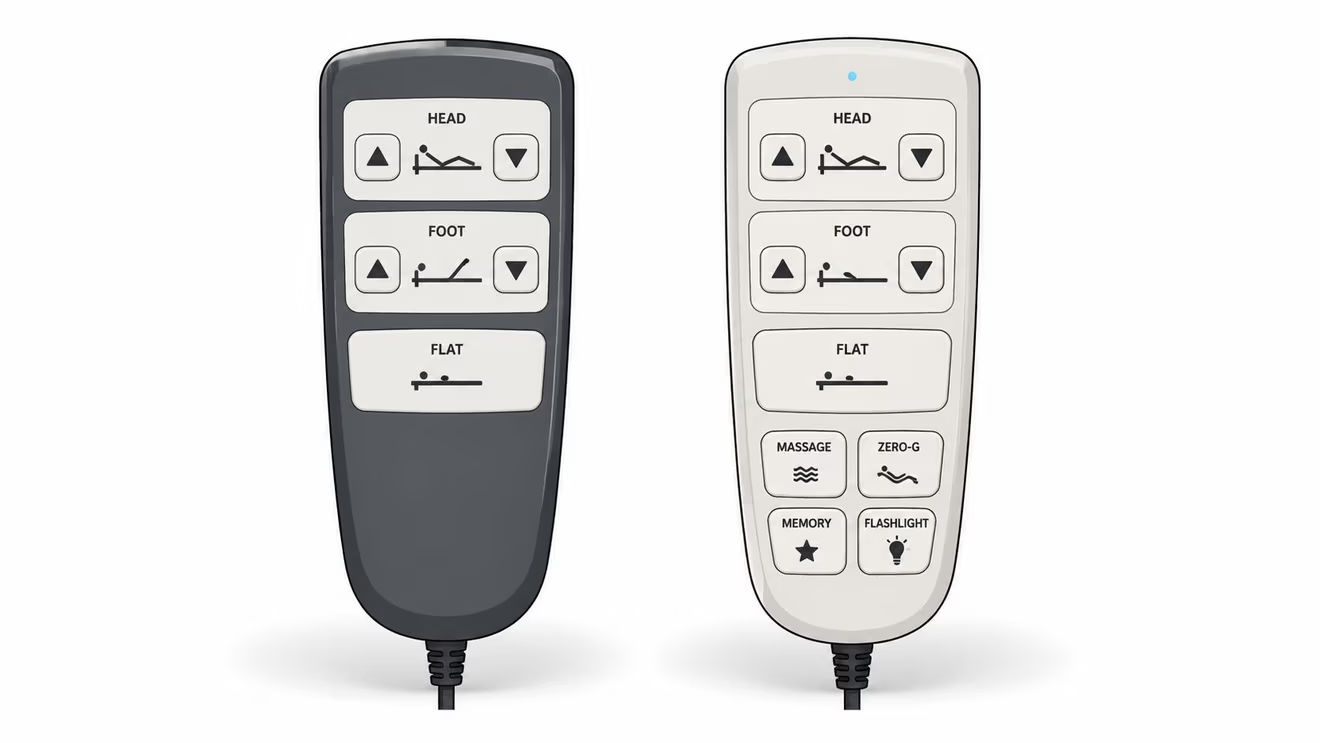
Most adjustable bed remotes share a familiar layout. Head arrows raise or lower the upper section, foot arrows adjust the lower section, and a Flat button returns the platform to a level position. The handset may also include preset, massage, light, lock, and memory controls.
The everyday controls
- Head Up and Head Down: Useful for reading, watching television, or finding a more supported reclined position.
- Foot Up and Foot Down: Adjusts leg elevation independently when the base supports separate foot movement.
- Flat: Sends both sections toward the level position, which is useful when getting out of bed or changing bedding.
- Lock: Some remotes include a child lock or travel lock that prevents accidental movement.
- Light: A handset may control an under-bed nightlight or another integrated lighting feature.
Presets that save effort
A Zero Gravity button commonly recalls a factory-default reclined position intended for relaxation and weight distribution. On some systems, the position can be reprogrammed by adjusting the bed, holding Set together with Zero Gravity, and waiting for an audible confirmation. The exact sequence varies by model, so the handset manual remains the authority.
Custom memory buttons provide another shortcut. Some remotes use M1, M2, and M3 for saved positions. One documented manual describes holding the selected memory button until the backlight flashes three times, typically after about five seconds, to store a position. A quick tap then recalls it.
Comfort extras
Massage controls may let users choose a mode or intensity, while USB ports provide a convenient charging point near the mattress. Not every system includes both features, so a showroom demonstration helps shoppers see how the buttons feel and whether the layout is easy to use in a dark bedroom. BILTRITE's information about an adjustable bed frame with massage can help shoppers identify which features matter before visiting.
How Pairing Actually Works Behind the Scenes
Pairing is the short handshake that connects a remote to its intended control box. Most adjustable bed systems use 2.4 GHz bi-directional wireless, the same crowded wireless band used by Wi-Fi and Bluetooth devices. Because several beds could operate in one room or nearby rooms, the control box needs a way to accept commands from the correct handset rather than every similar remote nearby. Details about this pairing behavior appear in this adjustable-bed remote pairing manual.
The usual pairing sequence
Exact buttons differ by manufacturer, but the process commonly follows this order:
- Restore power to the base. Unplugging and reconnecting the base resets the control box and begins its discovery period.
- Act quickly. Many systems offer a short enrollment window, often around 10 seconds after a reset, as documented in technical manuals.
- Start pairing on the remote. This may involve holding a pairing button or a specified combination until an indicator begins flashing.
- Watch the indicator. Pairing usually ends when the LED stops flashing or turns solid.
- Test one movement command. A small head or foot adjustment confirms whether the handshake worked.
Pairing can disappear after a battery change, control-box reset, power outage, or extended time without power. That doesn't necessarily mean the handset has failed. The most useful habit is to pair immediately after repowering the base, while keeping nearby wireless emitters and physical obstructions away from the control box.
Pairing isn't about making the remote “stronger.” It tells the base which device it should recognize.
A power pack or backup power accessory can be a separate part of an electric furniture system, but it doesn't replace correct pairing. Readers comparing power-support options can review BILTRITE's battery power pack information while checking the specific requirements of the adjustable base.
Quick Fixes When the Remote Stops Working
A calm sequence works better than random button pressing. The following order starts with the easiest causes and moves toward issues that may require service.
Start with the handset
Check the lock setting. A remote may illuminate while child lock or travel lock prevents every command. Look for a lock symbol or consult the instructions for the combination.
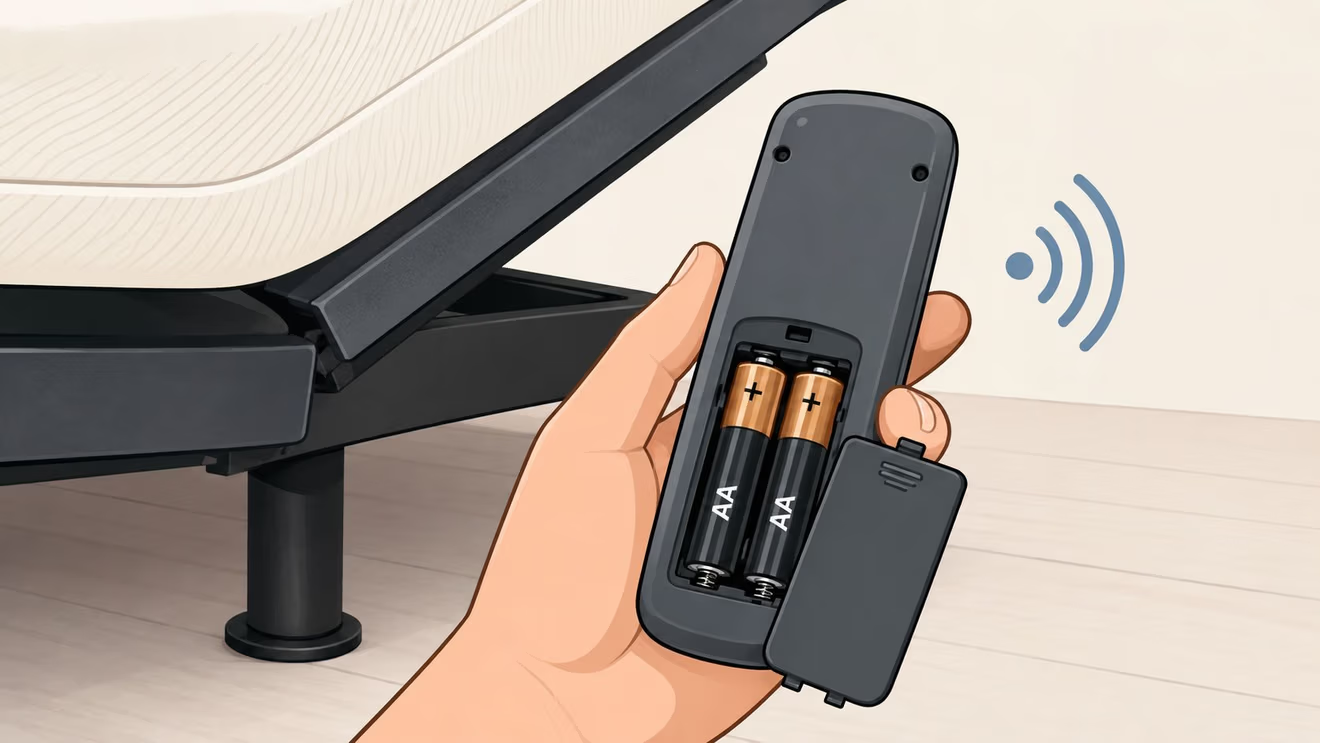
Replace the batteries. Use fresh batteries and match the positive and negative markings. Inspect the contacts for dirt, corrosion, or a loose fit. A handset with a dim backlight or selective button failures needs new batteries before anything else.
Check the room and the base
Confirm base power. Make sure the cord is firmly connected and the outlet works. If the base recently lost power, unplugging and reconnecting it can reset the control box.
Clear the signal path. Move pillows, blankets, and nightstands away from the receiver area. RF signals can lose strength when they pass through physical blockers, and nearby Wi-Fi routers, cordless phones, and smart devices can add interference.
Re-sync the handset. Follow the model-specific pairing sequence immediately after restoring power. A delay can cause the discovery window to close before the remote is enrolled.
Decide whether hardware is involved
If the remote still fails after batteries, lock mode, power, obstructions, interference, and pairing have been checked, the handset, receiver, control box, or wiring may need attention. A remote that works intermittently should still be treated as a signal or environment issue first, rather than proof of a failed motor.
BILTRITE's service request page gives Metro Milwaukee customers a place to start when hands-on help is appropriate. Bringing the original remote and any model information can make identification easier.
Range, Compatibility, and the Universal Remote Question
“Universal” sounds simple, but adjustable bed compatibility depends on the control box and communication protocol. A handset that looks similar may not share the correct pairing language, button commands, or receiver requirements. Many replacement listings also state explicitly that they aren't universal.
Wireless range differs by protocol and bedroom conditions. Reported open-air ranges describe RF remotes at roughly 10 to 15 metres, while Bluetooth remotes are described at about 5 to 10 metres in open air, with reduced performance through thick mattresses or walls. One Bluetooth handset manual specifies an effective distance within 5 metres, reinforcing that Bluetooth can provide a shorter practical range. These figures come from adjustable bed remote range guidance.
RF vs Bluetooth Adjustable Bed Remote Range
| Wireless Protocol | Typical Open-Air Range | Through Mattress or Walls |
|---|---|---|
| RF | Roughly 10 to 15 metres | Reduced by obstructions and interference |
| Bluetooth | About 5 to 10 metres | Reduced through thick mattresses or walls |
The table describes general reported ranges, not a guarantee for every bedroom. Receiver placement, the base design, walls, bedding, and nearby electronics all affect results.
How to check compatibility
The most reliable match usually comes from the control-box model or part number, not the color or logo on the handset. The original remote's model information can help, but a damaged remote may still be useful if its label is readable. The base frame may also carry identification information near the motor or head end.
A replacement remote is appropriate when the base and control box still function but the handset is missing, damaged, or unreliable. A universal-style handset may work only with certain control-box protocols. If the existing control box cannot accept the replacement, an upgrade or full conversion kit may be necessary.
Compatibility check: Match the remote to the control box first, then confirm the pairing method and supported features.
That step prevents a common mistake, buying a handset that can't communicate with the installed base. It also separates a dead remote from a base-side fault, two problems that can look identical from bed.
What Milwaukee Shoppers Should Think About Before Buying
An adjustable bed remote is a daily-use component, so shoppers should test it with the same care given to the mattress and base. The buttons should be easy to distinguish, the handset should feel comfortable in one hand, and the most-used controls should be reachable without searching in the dark.
Questions worth asking in a showroom
- Can the remote be tested? A demonstration reveals whether the head and foot controls respond smoothly and whether presets are easy to recall.
- What does the control box support? Ask which remote model pairs with the base and whether a replacement remains available.
- What happens after a power interruption? Staff should be able to explain how the base re-pairs and whether emergency lowering is included.
- What does the warranty cover? Confirm whether the remote, motors, control box, and installation have separate coverage.
- How is setup handled? Delivery and placement can matter as much as the product selection, especially in homes with stairs, narrow hallways, or older occupants.
BILTRITE's mattress department includes over 60 models, giving shoppers a chance to test an adjustable base with different mattress feels instead of judging the remote in isolation. The store also keeps 500+ mattresses in stock, with sleep specialists available to discuss support, comfort, and practical fit.
The in-store experience can also clarify household needs. A smaller bedroom may call for small-scale furniture, while a family or caregiver may need a heavy-duty frame or senior-friendly setup. Select purchases may include value extras such as white-glove delivery, removal of an old mattress in donatable condition, or a complimentary protector or heavy-duty frame. Details about pricing considerations appear in BILTRITE's guide to adjustable bed cost.
BILTRITE offers affordable, better-quality furniture, including USA-made, Amish-made, and solid-wood pieces, but the adjustable bed decision should remain grounded in comfort, usability, compatibility, and service.
How BILTRITE Helps With Demos, Replacements, and Setup
A showroom demonstration answers questions that product descriptions can't. A shopper can press the head and foot buttons, try Flat and Zero Gravity, test memory controls, and see whether the handset feels intuitive. That hands-on check is especially helpful for seniors, caregivers, couples sharing one base, and anyone who wants simple controls at bedtime.
BILTRITE Furniture-Leather-Mattresses provides an in-store option for discussing adjustable bases, mattress compatibility, replacement remotes, and setup. The Greenfield showroom team has over 400 years of combined sales experience, so customers can ask detailed questions without needing to decode every technical label alone.
Support can include identifying the correct replacement handset, checking whether the existing control box can pair with it, and explaining what to do after the base is repowered. White-glove installation can also take care of the physical setup, which leaves the customer with a functioning system rather than a box of parts and a confusing first night.
BILTRITE is located at 5430 West Layton Avenue in Greenfield, Wisconsin, serving Metro Milwaukee and surrounding communities. The family-owned business has operated since 1928 and stays closed on Sundays and Mondays to support family time. That buy-local approach keeps the experience personal, from the first button test to the final setup conversation.
BILTRITE Furniture-Leather-Mattresses offers adjustable bases, mattresses, and furniture with in-store guidance for shoppers who want to understand the remote before bringing a system home. Visit BILTRITE Furniture-Leather-Mattresses in Greenfield to test the controls, ask about replacement compatibility, and talk with the team about white-glove setup.