Furniture Visualizer Guide: How AR and 3D Tools Transform

You're standing in the living room, looking at an empty corner and trying to decide whether a new sofa will leave enough room to walk past it. Maybe a solid-oak bookcase would bring warmth to the space, but would its scale overwhelm the wall? A furniture visualizer can turn that guesswork into a practical preview by placing a digital version of a piece inside a real room.
That preview is useful, but it isn't the whole furniture-buying experience. A screen can help with dimensions, placement, and broad style decisions. It can't tell someone how a cushion feels, how solid a hardwood frame seems, or whether a recliner feels comfortable after several minutes. For Metro Milwaukee shoppers, digital planning works best alongside the kind of personal guidance available from a local showroom.
Why Furniture Visualizers Changed the Way We Shop
A shopper can stand in a showroom, like the shape of a sectional, and still hesitate over one question: How will this piece look in the room at home? Catalog photographs and styled displays offer useful context, but they leave the final comparison to memory and imagination.
A furniture visualizer brings that comparison into the shopper's own space. With a phone or tablet, someone can view a digital sofa, chair, table, or bookcase beside existing floors, walls, windows, and nearby furniture. The product stops being an isolated image and becomes part of a room-scale decision.
That matters for furniture with a strong physical presence. A plush sectional may appear inviting in a photograph yet crowd a narrow living room. An Amish-made oak bookcase may match a room's traditional character while requiring more wall space than expected. A preview can reveal those relationships before a family rearranges the room or schedules delivery.
From catalog cutouts to room-scale previews
Early digital furniture tools were similar to moving cutout images around a page. Current systems can use a device camera to identify floors and walls, then place a three-dimensional product within the room. Depending on the tool, shoppers may view the piece from different angles or adjust fabrics, finishes, configurations, and layouts.
The result offers a better starting point than a product photograph alone. It does not confirm that the furniture will feel comfortable or that its construction will meet expectations. Accurate measurements still matter, and an in-person visit lets shoppers test cushions, finishes, frame quality, and support with help from a local design associate.
Furniture visualization has become a familiar part of online shopping. IKEA launched IKEA Place in September 2017 as one of the first widely recognized consumer apps for placing lifelike virtual furniture in a room. By 2018, the company described the app as available on Android, with support for more than 3,200 IKEA products and 98% placement accuracy in a later market description, as documented by how shoppers and retailers adopted furniture AR and 3D tools.
Why shoppers now expect it
A 2026 industry study reports that consumers expect furniture retailers to offer 3D visualization instead of treating it as a special extra, according to research on furniture shopping trends. The reason is practical. Shoppers want to test how a piece could work in their own home before making a high-consideration decision.
A visualizer also supports the broader furniture buying journey from first research to final decision. It helps with early discovery, narrows the wish list, and gives shoppers clearer questions to bring to a BILTRITE showroom, where digital planning can meet tactile, local guidance.
How AR, 3D Models, and Room Planners Work
You are standing in your living room, comparing a recliner with the sofa already in place. The screen shows the chair at full scale, but you still need to know whether the room has enough clearance and whether the piece fits your daily routine. That is the role of a furniture visualizer. Different tools answer different planning questions, from checking one item to arranging an entire room.
Augmented reality for one-piece checks
Augmented reality works as a digital overlay. Your device camera shows the actual room while software places a virtual furniture item into that view. For a family considering a heavy-duty recliner, AR can show whether the chair's apparent scale feels reasonable beside the sofa and whether its position leaves a usable path.
It can also help with sightlines. You may notice that the recliner blocks a lamp, television, or doorway before moving a physical piece into the room.
AR depends on the device recognizing surfaces. The camera needs to identify a floor or wall as a reference point. Dark lighting, clutter, and visually confusing surroundings can make placement less reliable, so the image is a planning aid rather than a final measurement.
A peer-reviewed implementation reported 2.3 centimeters of average placement error across 200 placements, with error rising from 1.8 centimeters at one meter to 3.2 centimeters at three meters. The same system sustained 32 frames per second with up to five concurrent objects and recorded 94.7% plane-detection accuracy across more than 500 test scenarios, according to the published furniture visualization implementation. Those findings explain why calibration, lighting, and viewing distance affect the result.
3D configurators for customization
A 3D configurator works like a model on a turntable. It is product-focused rather than room-focused. You can rotate a sofa, sectional, dining table, or bedroom piece, then compare upholstery, wood finish, hardware, size, or sectional orientation.
This approach helps organize choices when one piece has several possible configurations. You might compare how a walnut finish differs from a cherry finish, or see how a chaise changes a sectional's visual balance.
The model supports the decision, while physical samples confirm details a screen cannot reproduce perfectly. Fabric texture, sheen, and wood color can change with lighting and display settings. A BILTRITE design associate can connect those digital comparisons with samples and product specifications in the showroom.
Room planners for complete layouts
A room planner works like digital graph paper. You map the room, add doors and windows, and move several furniture pieces around to test layouts. For a bedroom, that may include the bed, nightstands, dresser, doors, and walking paths. For a small apartment, you can test whether a compact sofa, occasional table, and media unit fit without making the room feel cramped.
The BILTRITE space-planning tool helps you compare room dimensions with furniture dimensions before visiting the showroom. Bring the plan along, then check actual product specifications and discuss clearances with a local associate. The plan gives you a starting point. Human guidance helps turn that starting point into a room that works in Milwaukee homes.
Benefits for Shoppers and Local Stores
A shopper comparing a sofa, sectional, or dining set needs a clearer sense of how the piece will support daily life. Visualization helps connect a product page with practical questions about room scale, traffic flow, color relationships, and household routines. For a small apartment, the tool may show whether a compact sofa leaves a workable path to the kitchen. In a family room, it can help compare a sectional with separate seating. For a solid-wood dining set, it offers an early sense of proportion before the family examines construction and finish in person.
That combination matters because furniture is a high-consideration purchase. The BILTRITE guide to high-consideration furniture decisions explains why shoppers often need time, product knowledge, and discussion before choosing. A visualizer organizes the possibilities. A local design associate adds the hands-on context, including comfort, materials, delivery access, and how a piece fits the household.
What the commercial evidence shows
Furniture visualizers appear more often among stronger retail operations. An independent 2026 analysis of 42,817 active US Shopify furniture and home décor stores found that 26% of the top 100 stores by revenue used an AR or 3D visualization app, compared with 13% of the top 500 and 5% of all stores above $1 million in annual revenue. The pattern suggests that leading retailers increasingly view visualization as part of merchandising and revenue strategy.
A 2025 survey of 100 senior furniture-industry decision-makers across the UK and US found that 58% had implemented AR technology. It also reported that 96% said 3D visualization and AR tools increased sales, while 82% said they could estimate a strong return on investment. Among e-commerce leaders, 64% offered a fully integrated AR experience, compared with 45% of mainstream retailers, and 90% planned to expand visualization usage that year, according to the furniture retail AR research summary.
Visualizer Impact on Shopping Confidence
| Metric | Impact |
|---|---|
| Average configurations per session | 6 configurations, according to 3D commerce retail data |
| Add-to-cart rate | 30% increase for the reported retailer data |
| WebAR usage | 30% among enabled retailers |
| Configurator launch speed | 80% faster time-to-market |
| Room-planning outcomes | 4.5x increase in cart conversion and 25% reduction in returns in related retail analytics |
These figures describe reported retail results, not a guarantee for every shopper. They show why stores invest in tools that help customers compare choices with greater confidence. At BILTRITE, the strongest process combines that digital preview with showroom conversation, product specifications, material samples, comfort testing, and practical planning for delivery.
Practical rule: Use visualization to narrow the decision. Use real measurements and human guidance to make the decision responsibly.
Step-by-Step Tips for Getting Accurate Results
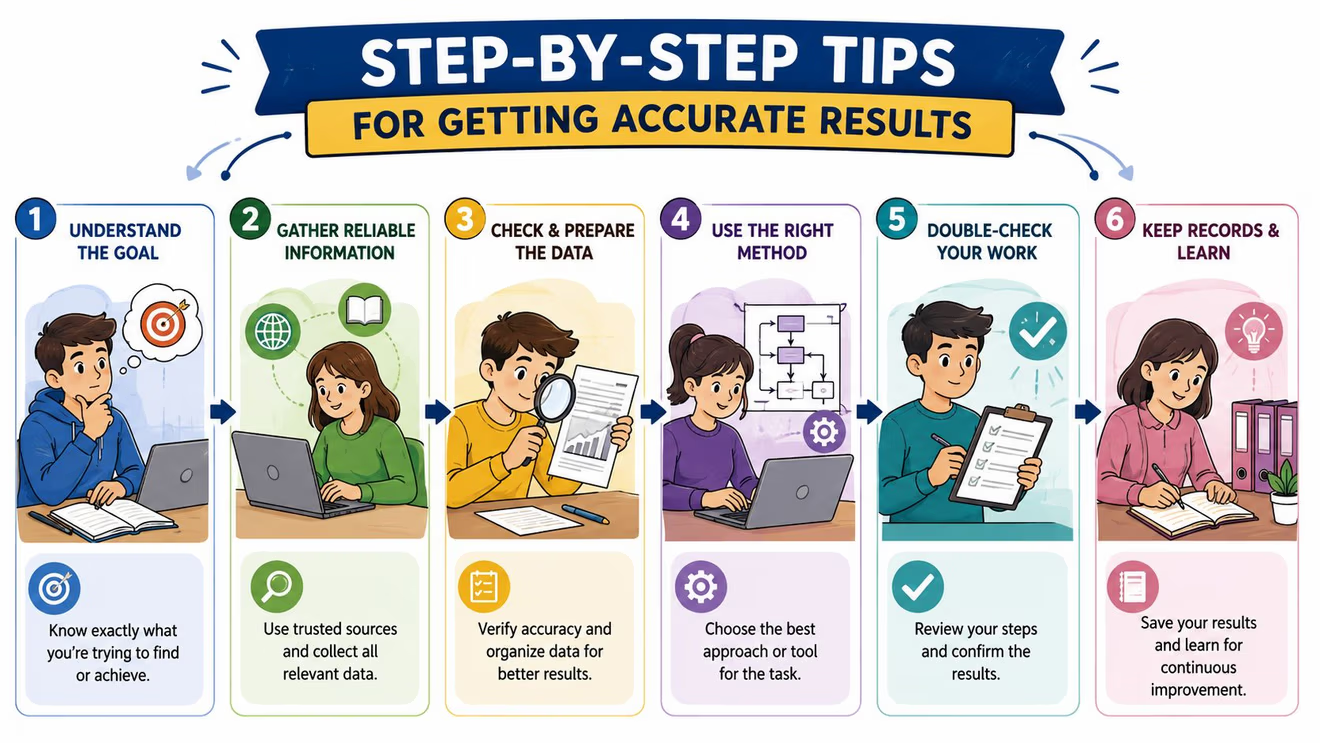
A furniture visualizer works best when the shopper prepares the room before opening the camera. The digital preview can only respond to the information it receives, so a few simple checks improve the usefulness of the result.
Start with the room, not the product
Clear the floor area. Move loose items, baskets, and small tables away from the space being scanned. A clear floor gives the camera a better chance to recognize the surface and helps the shopper see the proposed footprint.
Improve the lighting. Turn on room lights and open curtains where possible. Even lighting makes walls, floors, and edges easier for the device to identify. Harsh reflections, deep shadows, and dark corners can make placement less dependable.
Measure the important boundaries. Record the wall length, doorway width, hallway width, ceiling height where relevant, and the distance available for walking paths. A digital object may appear to fit on screen while the actual furniture still can't pass through the entry route.
Check the product dimensions manually. Compare the listed width, depth, and height with the room notes. For recliners, account for the space needed when the footrest opens. For sectionals, confirm the orientation and the location of the chaise.
The BILTRITE guide to measuring furniture can help shoppers organize these checks before a showroom visit.
Test the way the room will actually be used
A room isn't a photograph. People walk through it, open drawers, pull out chairs, stretch out on sofas, and carry laundry baskets past furniture. After placing an item, the shopper should inspect the walking routes and consider the clearances needed for everyday activities.
A small-scale sofa may suit an apartment, but the room still needs space for a coffee table and passage to the door. A large family may need a heavier-duty frame or broader seating, even if a slimmer product looks more balanced in the preview. A bedroom layout should leave enough room to make the bed, open storage, and move safely around corners.
Compare style, not just size
Use the visualizer to compare relationships. A cherry finish may coordinate with existing flooring, while a lighter wood may create more contrast. A leather chair may introduce a different texture from a fabric sofa. These previews help identify a direction, but physical swatches and showroom samples remain the final check.
Before visiting a store, shoppers can save screenshots and write down questions. That small record gives a design associate something concrete to review, especially when the household is comparing several room arrangements.
Privacy, Compatibility, and the Limits of Digital Tools
Before scanning a room, check what the visualizer can access. Camera-based features may request permission to view parts of a private home, and some services may store room images. Read the privacy information, then grant only the access the feature needs.
Compatibility varies by device. Newer phones and tablets may handle advanced AR functions more smoothly, while older hardware might limit placement or measurement features. A browser-based room planner can provide another path when camera access or AR support is unavailable.
Room conditions affect the preview too. Low light, reflective surfaces, visual clutter, and floors without clear reference points can make placement less reliable. Treat the result as an estimate that supports careful measuring. It is a helpful sketch, rather than a guarantee that delivered furniture will occupy the identical visual position.
What a screen can't tell a shopper
Digital tools excel at scale, arrangement, and visual comparison, while sensory and structural evaluation require in-person attention. A screen cannot reproduce the feel of solid Amish craftsmanship, the response of a high-density cushion, the texture of real hardwood, or the support of a hand-tied spring system.
Solid hardwoods such as oak, maple, cherry, and walnut are commonly associated with Amish furniture, along with traditional handcraft methods and joinery instead of particleboard or other engineered materials, as described by this overview of Amish furniture design and construction. Those qualities become easier to judge when shoppers can see and touch the furniture in a showroom.
Color requires the same care. Screens display finishes differently, and room lighting changes how upholstery and wood appear. Bring room photos when comparing options, then check physical samples before deciding. This resource on avoiding color mismatch explains why real-material checks matter.
A visualizer can show whether a piece belongs in the room. Sitting, touching, and testing reveal whether it belongs in the household.
Delivery details also sit outside the preview. White-glove mattress service may include in-room placement, setup, packaging removal, and an optional old-mattress removal step. Policies differ, including whether removal requires advance scheduling or occurs during the new delivery, so ask the showroom about the service before delivery day. A local design associate can connect those practical details with the room plan, helping digital planning and hands-on guidance work together.
Bringing Your Vision to Life at BILTRITE
A furniture visualizer can help a household arrive at the showroom with a clearer starting point. A saved room image, a rough floor plan, and a list of preferred finishes give a design associate useful context. The next step is experiencing real furniture in person.
BILTRITE is a fourth-generation, family-owned business serving Metro Milwaukee since 1928. The Greenfield showroom focuses on affordable, better-quality furniture, with a strong selection of USA-made, Amish-made, and solid-wood pieces. The store also carries choices for different spaces and households, including small-scale furniture for apartments and condos, heavy-duty furniture for families and caregivers, and come-apart sofas and sectionals for narrow doorways.
Digital planning meets showroom guidance
A visualizer may suggest that a particular sofa fits a room. A design associate can help evaluate whether its seat depth suits the household, whether the fabric works for daily use, and whether delivery access creates a concern. BILTRITE's sales associates bring more than 400 years of combined experience, and their role is to help shoppers work through those practical questions without pressure.
The same approach matters in the mattress department. BILTRITE offers over 60 models and more than 500 mattresses in stock, giving shoppers an opportunity to compare support and comfort in person. A digital room plan may confirm where a bed belongs, but it can't determine whether the mattress feels supportive through a full rest period.
Shoppers can also use the BILTRITE Design Center to organize ideas before bringing them into the showroom. The store doesn't sell online, so the in-person visit remains central. Customers can sit on furniture, inspect wood and upholstery, compare proportions, and talk through delivery and room-access details.
BILTRITE is located at 5430 West Layton Avenue in Greenfield, Wisconsin, and the showroom is closed on Sundays and Mondays to support family time. That family-first schedule reflects the store's local, buy-local identity while giving shoppers a place to turn digital inspiration into an informed home decision.
BILTRITE Furniture-Leather-Mattresses offers USA-made, Amish-made, solid-wood furniture, small-scale and heavy-duty options, and a mattress department with over 60 models and 500-plus mattresses in stock. Use a furniture visualizer to organize room ideas, then visit BILTRITE Furniture-Leather-Mattresses in Greenfield to see, touch, and test the choices with an experienced local team.